Connect Box and eno will search it for you. Ask a question, eno goes looking for the files that answer it, pulls what it needs onto your machine, and cites the exact passages.
Setup takes a couple of minutes, once per account.
In this guide
What you’ll need
- eno 0.8.3 or later, signed in to your eno account. The connection lives on your account, not your machine, so connecting once covers every computer you sign in on.
- A Box account with access to the documents you want to search. eno acts as you. It can reach what you can reach, and nothing else.
Find the Integrations settings
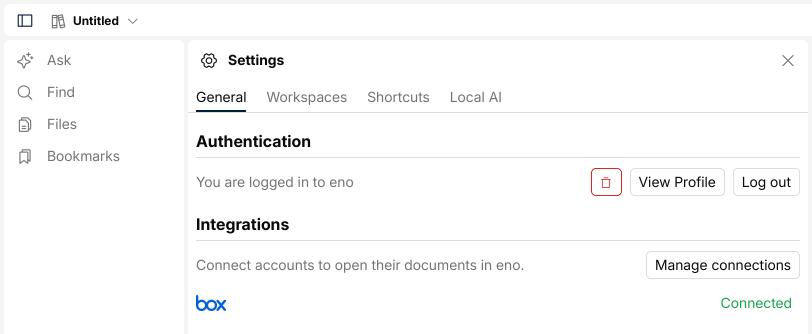
Open Settings from the bottom of the rail. On the General tab, under Authentication, there’s an Integrations section listing each provider and whether it’s connected.
Connecting happens on the web, not in the app. Click Manage connections to open your eno profile at app.enopdf.com/auth/profile/integrations. You can go there directly instead.
Connect your Box account
On the Box card, click Connect Box Account. Box takes it from there: sign in if you need to, then approve eno’s access to your files.
You come back to the card, which now reads Connected as your Box name. That’s the whole setup.
Search Box from eno
Back in eno, the Box row flips to Connected. eno refreshes that status when the Settings panel opens and when the app window regains focus, so if it still says Not connected, click into the eno window.
Connected providers appear as small logo tiles in the footer of the Ask composer, next to the send button. The Box tile is a toggle for each search. Lit up, eno searches Box for that question. Greyed out, it searches only what’s already in your workspace.
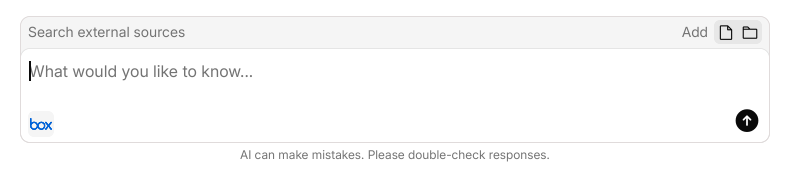
The first time Box shows up connected in an empty workspace, eno turns it on for you. After that it’s your call, per search.
Then ask your question. eno searches Box, and once it has narrowed things down it shows a card headed Select files to import. Tick the files you want and eno downloads them into your workspace and carries on answering. Expect a clarifying question first if the question was ambiguous.
Files come down to your machine. eno doesn’t copy them to another cloud service, and it only fetches file contents when you use the integration.
Disconnecting
Go back to the Integrations page and click Disconnect on the Box card. eno drops its stored tokens straight away and the Box row in Settings returns to Not connected.
Troubleshooting
No Integrations section in Settings. You’re not signed in to eno. The section is replaced by a prompt to log in until you are.
Settings still says Not connected. The status refreshes when the panel opens and when the eno window regains focus. Click into the eno window, or close and reopen Settings.
No Box tile in the Ask composer. Tiles only appear for connected providers. Check Settings first.
eno can’t find a file you know is there. eno searches as you. If the file sits in a folder your Box account can’t open, eno can’t open it either.
Still stuck?
Email support@enopdf.com with your eno version and a screenshot of what you’re seeing. Our Discord works too. The team is around most days.